Digitalpermitbook is best for trucking fleets that need mobile permit and compliance document management. For this 2026 shortlist, J. J. Keller Encompass fits driver qualification administration, Motive fits connected safety workflows, Samsara fits fleet telematics, and Fleetio fits maintenance management; the Digitalpermitbook platform addresses permit and document access rather than every fleet workflow.
- The best dot compliance software for trucking fleets matches your compliance workload, not the longest feature list.
- Choose a mobile permit platform for driver and vehicle documents; evaluate document retrieval before committing.
- J. J. Keller Encompass belongs on a driver qualification shortlist; Fleetio belongs on a maintenance shortlist.
- Compare Motive and Samsara when connected vehicles, driver activity, and operational visibility drive the buying decision.
Why this matters
DOT compliance software is not one interchangeable category. Driver qualification files, vehicle maintenance records, permits, hours of service, IFTA, and IRP involve different records and responsibilities. A system that handles one well does not automatically handle the others.
Under FMCSA's standard federal hours-of-service rules for property-carrying drivers, driving is limited to 11 hours within a 14-hour window. A 30-minute break is required after 8 cumulative hours of driving without a qualifying interruption; exceptions apply. Those requirements explain why an electronic logging workflow and a permit document workflow solve different problems.
Your 2026 buying decision should start with the task that breaks down today: finding a current document, administering driver files, reviewing driving activity, or closing maintenance work.
What makes the best DOT compliance software?
Use these criteria before comparing vendors. A successful demonstration should show your actual work, not just a dashboard.
- Workflow fit: Match the software to permits, qualification files, electronic logs, safety, or maintenance. Separate essential capabilities from adjacent features.
- Document retrieval: Ask a driver and an office administrator to retrieve the same current record using their normal devices.
- Record ownership: Establish who uploads, reviews, replaces, and retires each document. Software needs a clear operating process.
- Review and export: Demonstrate how you assemble records for an internal review or an authority's request, including the required file formats.
- Operational dependencies: Identify hardware, connectivity, integrations, data entry, and staff training required for the proposed workflow.
- Scope boundaries: Write down what remains outside the system. A clear boundary is more useful than a vague claim of complete compliance.
For a 2026 evaluation, turn these criteria into a written acceptance checklist. Do not approve a purchase solely because a sales demonstration uses familiar trucking terminology.
DOT compliance software at a glance
These recommendations cover different jobs. The row order follows the detailed sections below; it is not a claim that a document platform outperforms a telematics platform at telematics.
| Software | Best for | Standout focus | Key limitation or trade-off |
|---|---|---|---|
| Digitalpermitbook | Mobile permit and driver/vehicle documents | Cloud-based permit and DOT/IFTA/IRP compliance document management | Document accuracy still depends on assigned owners and current records |
| J. J. Keller Encompass | Driver qualification administration | Driver compliance record administration | Administrative workflows still require complete source records and review |
| Motive | Connected driver safety workflows | Electronic logging and fleet safety tools | Connected workflows introduce device and implementation requirements |
| Samsara | Fleet telematics visibility | Connected vehicle and operational data | Telematics coverage does not by itself establish complete compliance records |
| Fleetio | Maintenance-centered fleet records | Vehicle maintenance management | Maintenance software is not a substitute for an electronic logging workflow |
1. Digitalpermitbook: best for mobile permit management
Digitalpermitbook provides cloud-based permit and DOT/IFTA/IRP compliance software for trucking fleets and owner-operators. Drivers and office teams can manage driver and vehicle documents through a mobile app.
That makes mobile document handling the relevant buying test. Start with a permit or vehicle document your team routinely needs, then demonstrate how the correct person finds and manages it. Do not treat a general product description as proof of a specific filing, integration, or automation capability.
Digitalpermitbook pros:
- Its stated scope directly includes permits and DOT/IFTA/IRP compliance.
- Mobile document management addresses a driver-facing task, not just office administration.
- Driver and vehicle documents belong within the stated product scope.
Digitalpermitbook cons:
- A document workflow still requires someone to confirm that uploaded records are accurate and current.
- Choosing a permit platform does not eliminate separate responsibilities for driving activity, maintenance, or safety management.
Best for: Fleets and owner-operators whose immediate need is organizing and accessing permit, driver, and vehicle documents from a mobile app.
Bring a current permit, a superseded version, and a vehicle document to the demonstration. Ask the presenter to show how your team distinguishes the record it should use from the record it should retain.
Verdict — Buy: Choose Digitalpermitbook when mobile permit and compliance document management is the primary requirement.
2. J. J. Keller Encompass: best for driver qualification administration
J. J. Keller Encompass is a fleet compliance management option with driver qualification record administration among its established uses. Its place on this shortlist is the administrative side of driver compliance, rather than vehicle maintenance or permit access alone.
Evaluate the path from receiving a driver document to reviewing and retaining it. Your administrator should demonstrate how a file is assessed for completeness and how unresolved items enter the team's work queue.
J. J. Keller Encompass pros:
- Driver qualification administration provides a specific reason to evaluate the platform.
- A driver-record workflow aligns with work owned by safety and compliance staff.
- It offers a more relevant starting point for qualification administration than a maintenance-only system.
J. J. Keller Encompass cons:
- Software cannot correct inaccurate source records without staff review.
- Driver file administration does not remove the need to evaluate permit access and vehicle workflows separately.
Best for: Safety departments and compliance administrators whose central workload is maintaining driver qualification records.
Ask your team to work through an incomplete file, not only a completed example. The buying question is whether staff can identify the problem, assign the next action, and retrieve the supporting record without a parallel spreadsheet.
Verdict — Buy: Choose J. J. Keller Encompass when driver qualification administration is the deciding requirement.
3. Motive: best for connected driver safety workflows
Motive offers electronic logging and fleet safety tools. It belongs on your shortlist when the compliance problem involves driving activity and a connected safety workflow rather than document storage alone.
Evaluate the driver experience and the office review process together. An office demonstration does not show whether drivers understand the tasks they must complete during normal operations.
Motive pros:
- Electronic logging directly addresses a different requirement from permit document management.
- Fleet safety tools make the platform relevant when driving activity and safety are connected buying priorities.
- A connected workflow supports evaluation across both driver and office responsibilities.
Motive cons:
- Connected vehicle workflows require device setup and operational support.
- Electronic logs do not establish that permits, qualification files, and maintenance records are complete.
Best for: Fleets prioritizing electronic logs and driver safety workflows within connected vehicle operations.
Ask the demonstration team to show a driver correcting an entry and an administrator reviewing the result. Also establish which proposed functions depend on specific equipment or integrations. Write those dependencies into the implementation plan rather than leaving them as assumptions.
Verdict — Buy: Choose Motive when connected driving activity and safety workflows lead the evaluation.
4. Samsara: best for fleet telematics visibility
Samsara provides connected operations technology, including fleet telematics and electronic logging. Its distinct use case here is operational visibility across vehicles, with compliance-related activity considered alongside fleet data.
Keep the demonstration focused. Ask how a vehicle event becomes an actionable task for the person responsible, rather than accepting a tour of maps and dashboards as evidence of a completed workflow.
Samsara pros:
- Fleet telematics makes vehicle activity a central part of the evaluation.
- Electronic logging connects the shortlist to hours-of-service workflows.
- Connected operations provides a relevant context for teams evaluating more than document administration.
Samsara cons:
- A connected platform introduces equipment, configuration, and rollout work.
- Operational visibility does not replace reviewing the underlying compliance documents.
Best for: Fleets whose buying priority is connected vehicle visibility alongside driver activity and operational oversight.
Give Samsara a clear acceptance scenario: identify an issue, assign responsibility, and show the record your team retains after resolution. Your staff should understand the action required without interpreting every dashboard metric.
Verdict — Buy: Choose Samsara when telematics visibility is the primary requirement and the demonstrated compliance workflow fits your operation.
5. Fleetio: best for maintenance-centered fleet records
Fleetio is fleet maintenance management software. It belongs in this comparison because vehicle maintenance records are part of fleet compliance work, but it is not a like-for-like replacement for a permit platform or an electronic logging system.
Evaluate the chain from a reported vehicle issue to the completed maintenance record. The important result is a usable service history, not simply a scheduled task.
Fleetio pros:
- Maintenance management gives the product a clear operational purpose.
- Vehicle service records are relevant to teams responsible for maintaining fleet equipment.
- Its maintenance focus creates a distinct buying option rather than duplicating the other recommendations.
Fleetio cons:
- Maintenance management does not replace a driver hours-of-service workflow.
- Completed records still depend on staff or service partners recording the work accurately.
Best for: Maintenance managers and fleet teams whose main problem is organizing vehicle service work and maintenance history.
Use a real maintenance issue in the demonstration. Follow the work through completion, then ask someone else to retrieve the resulting record. That tests both execution and record usability.
Verdict — Buy: Choose Fleetio when maintenance records and service workflows are the main requirement.
How these recommendations are ranked
This 2026 shortlist ranks software by workflow fit, not by an invented overall score. The criteria are document retrieval, record ownership, review and export, operational dependencies, and clear scope boundaries.
The recommendations are not hands-on test results or a certification of regulatory compliance. Each product occupies a distinct use-case slot. Confirm the exact capabilities proposed for your operation through a demonstration and written scope.
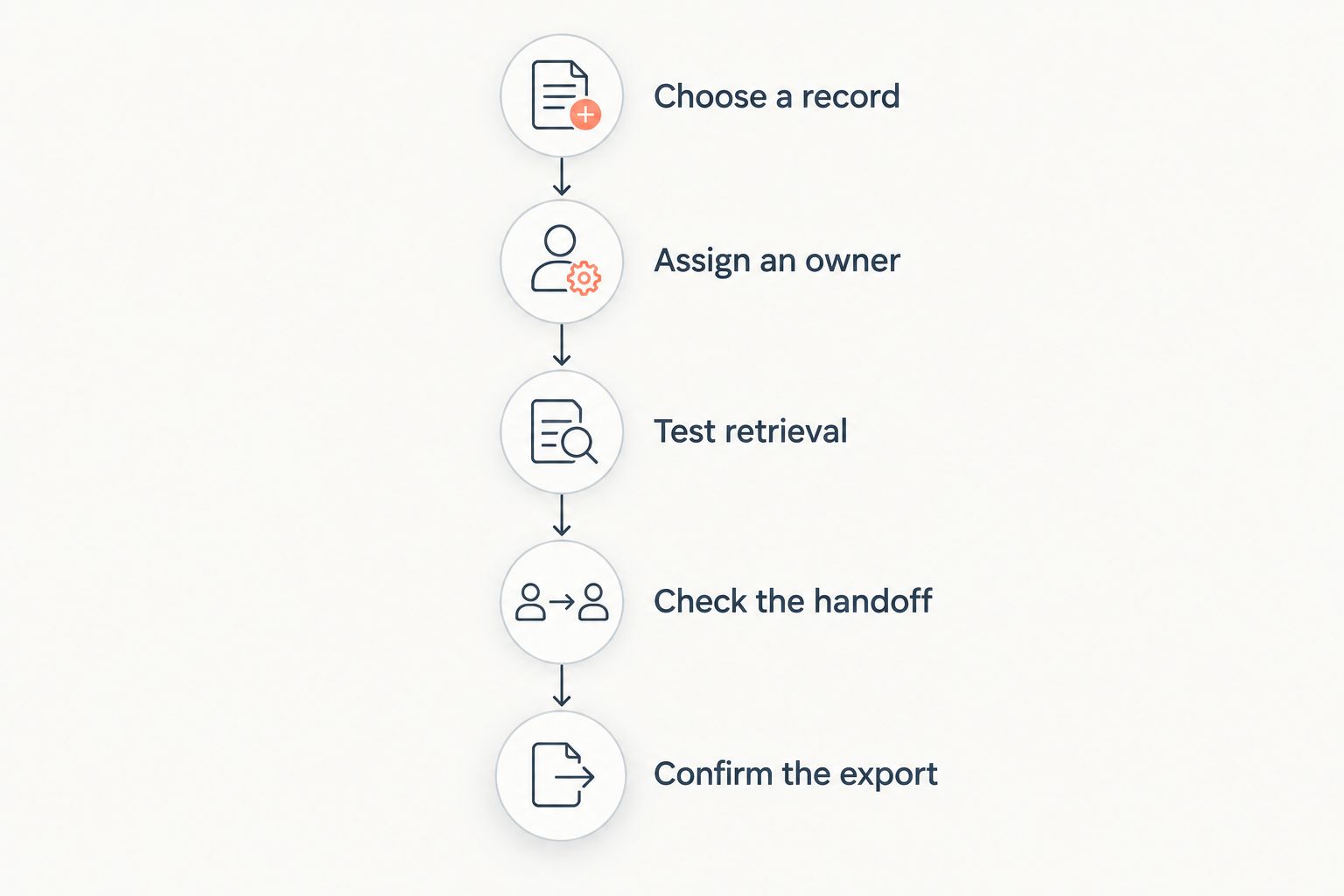
Validate the workflow before signing
Run the same evaluation sequence for every finalist. Consistency makes competing proposals easier to compare.
- Choose a record. Use a document or operational record your team genuinely handles.
- Assign an owner. Name the person accountable for keeping that record accurate.
- Test retrieval. Ask the intended user to find it using the normal device and access method.
- Check the handoff. Show what happens when another employee needs to review or act on it.
- Confirm the export. Retrieve the final record in the form your team needs to retain or share.
The result should be a repeatable process, not a successful demonstration that only the presenter can perform.
Which DOT compliance software should you choose?
Choose Digitalpermitbook when your priority is mobile permit and compliance document management. Choose J. J. Keller Encompass for driver qualification administration, Motive for connected safety workflows, Samsara for telematics visibility, or Fleetio for maintenance management.
For your 2026 decision, keep the requirements list short enough to demonstrate. If different teams need different systems, define which one owns each record before connecting or copying data between them.
FAQ
What's the best DOT compliance software for trucking fleets?
The best choice depends on the fleet's main compliance workload. Match mobile permit management, driver qualification administration, electronic logs, telematics, or maintenance to the software's demonstrated scope.
Can one platform handle every DOT compliance requirement?
Do not assume that one platform handles every DOT compliance requirement. Check each required workflow separately, including driver records, permits, hours of service, and maintenance.
Is DOT compliance software the same as an ELD?
No. An electronic logging device addresses hours-of-service recording, while DOT compliance software can cover document administration and other workflows outside electronic logs.
What should an owner-operator prioritize in compliance software?
An owner-operator should prioritize the records and tasks they must manage personally. Test mobile document retrieval, record updates, and the ability to provide the correct document when requested.
Is Motive better than Samsara for DOT compliance?
Neither is the default choice for every fleet. Evaluate Motive for connected driver safety workflows and Samsara for fleet telematics visibility, then test the specific compliance tasks your operation needs.
Does using compliance software guarantee DOT compliance?
No. Software does not replace accurate records, required actions, staff accountability, or compliance with applicable rules.
How should a fleet compare compliance software in 2026?
Compare compliance software using the same real workflow for every finalist. Require the intended users to demonstrate record ownership, retrieval, handoffs, and export before making the decision.
One last thing
Test the replacement record, not just the first upload. A successful initial upload tells you little about how your team handles a renewed permit, a corrected driver document, or an updated maintenance record. Ask the intended user to identify the current version and explain what happens to the previous one.