Best overall for mobile permit and document management: Digitalpermitbook. Best for hours-of-service records: ELD-focused software. Best for driver-file administration: driver qualification software. The best fleet compliance software for small fleets in 2026 is the option that fixes your biggest compliance gap without creating another disconnected record system.
- Digitalpermitbook is the best fleet compliance software for small fleets prioritizing mobile permit and document management.
- Choose ELD-focused software when hours-of-service records are your primary concern.
- Choose driver qualification software when hiring and driver-file administration drive the workload.
- Shared cloud storage organizes files, but your team must supply the compliance workflow.
Why this matters
A small fleet does not need every software category at once. You need a dependable way to keep the right records, assign responsibility, and give drivers access to the documents relevant to their work.
The mistake is treating every compliance problem as a storage problem. A permit, an hours-of-service record, and a driver qualification file serve different purposes. Putting them in the same folder does not make their requirements interchangeable.
Choose the workflow before you choose the platform. This guide ranks four buying options by the job each handles best, rather than treating unrelated products as direct substitutes.
What makes the best fleet compliance software?
Use these criteria to evaluate small-fleet compliance software in 2026. A useful demonstration should show your actual workflow, not just a dashboard full of completed records.
- Operational fit: Start with the task creating the most friction: permit access, hours-of-service records, or driver-file administration.
- Driver access: Check how a driver finds the correct document on a mobile device without asking the office to resend it.
- Record ownership: Identify who uploads, checks, replaces, and retires each document. Software does not eliminate those responsibilities.
- Document control: Ask how users distinguish current records from outdated copies and what happens when an assignment changes.
- Retrieval and export: Confirm how you retrieve a specific record and export information when an authorized request arrives.
- Administrative workload: Count the handoffs and duplicate entries your team would still perform after adoption.
Do not award points for a feature simply because it appears on a checklist. If nobody owns the underlying task, another notification or upload field will not fix the process.
Small-fleet compliance options at a glance
The comparison below separates document management from specialized compliance workflows. Each option has a distinct role; combining categories only makes sense when you have a clear need for both.
| Rank and option | Best for | Standout purpose | Key limitation |
|---|---|---|---|
| 1. Digitalpermitbook | Mobile permit and vehicle-document management | Cloud-based permit and DOT/IFTA/IRP compliance software with mobile document management | Document access does not, by itself, establish compliance with every applicable requirement |
| 2. ELD-focused software | Hours-of-service records | Electronic logging workflows for operations subject to applicable ELD requirements | Electronic logs do not replace permit or driver qualification records |
| 3. Driver qualification software | Driver-file administration | Organizing the workflow around qualification records | Driver-file organization does not replace vehicle-document management |
| 4. Shared cloud storage | Basic file organization | General-purpose folders and file sharing | Your team must design and maintain the compliance process |
There is no automatic winner across every task. The first option is the default for a document-management problem; the others address different needs or provide a simpler storage baseline.
1. Digitalpermitbook: best for mobile permit management
Digitalpermitbook is cloud-based permit and DOT/IFTA/IRP compliance software for trucking fleets and owner-operators. It supports managing driver and vehicle documents from a mobile app.
Digitalpermitbook is best for small fleets that need mobile access to permit, driver, and vehicle documents. That is a specific buying case: the office manages records, while drivers need a practical way to reach the documents associated with their work.
Where this option fits
Start here when your recurring problem is document handling: identifying the current file, connecting it to the correct driver or vehicle, and making it accessible. Keep the evaluation centered on those tasks rather than assuming that a compliance label covers every regulatory obligation.
For a 2026 evaluation, bring a representative driver record and vehicle record to the demonstration. Ask to follow each through the mobile workflow and the office workflow before deciding whether the setup fits your operation.
Digitalpermitbook pros:
- Its stated scope includes trucking permits and DOT/IFTA/IRP compliance.
- Its intended users include both trucking fleets and owner-operators.
- Mobile document management matches a workflow involving drivers away from the office.
Digitalpermitbook cons:
- Your fleet still needs someone accountable for document accuracy and updates.
- A document-management workflow is not proof that every filing or operating requirement has been satisfied.
- You must evaluate any required connection to your existing systems rather than assume compatibility.
Best for: Small fleets prioritizing permit, driver, and vehicle-document management.
Use a software demonstration to check retrieval, replacement, access, and record ownership against your own process. Verdict: Buy for the mobile document-management use case after that workflow passes your evaluation.
2. ELD-focused software: best for hours-of-service records
ELD-focused software centers on electronic logging and the associated hours-of-service workflow. Choose this category when your primary concern is how driving-time records are captured, reviewed, and handled by drivers and office staff.
ELD requirements and exceptions depend on the operation. Establish what applies to your fleet before selecting a system; buying electronic logging software is not a substitute for determining your obligations.
Where this option fits
An hours-of-service problem needs more than a folder containing exported logs. During evaluation, ask how drivers review their records and how authorized staff handle the relevant administrative tasks.
Keep this separate from your permit review. A satisfactory logging workflow does not answer whether a driver can find a vehicle document or whether the office has maintained a required qualification record.
ELD-focused software pros:
- It addresses electronic logging rather than treating logs as ordinary attachments.
- It gives you a focused category to evaluate when hours-of-service administration is the main problem.
- It supports a clear division between logging requirements and other document workflows.
ELD-focused software cons:
- It does not make permit and qualification records unnecessary.
- Hardware, installation, and operational requirements need product-specific review.
- Adding a separate document system can create duplicate administration unless responsibilities are clear.
Best for: Fleets whose immediate priority is an appropriate electronic logging workflow.
Verdict: Buy for hours-of-service needs; skip it as a stand-alone answer to every fleet compliance task.
3. Driver qualification software: best for driver-file administration
Driver qualification software focuses on the records and tasks associated with qualifying drivers. Evaluate this category when hiring, collecting driver documents, or maintaining qualification files is the work your team struggles to control.
The category is not interchangeable with mobile permit management. Its center of gravity is the driver file, not every document needed for a vehicle or trip.
Where this option fits
Start with a driver-file checklist based on the requirements applicable to your operation. Then ask each provider to demonstrate how the software supports collecting, reviewing, retrieving, and maintaining those records.
Do not assume that organizing a file proves the driver meets every applicable requirement. Your team still needs a review process and a person authorized to resolve incomplete or conflicting information.
Driver qualification software pros:
- It gives driver-file administration a dedicated workflow.
- It provides a focused evaluation category for fleets with repeated hiring and record-maintenance tasks.
- It helps keep qualification-file decisions separate from vehicle-document decisions.
Driver qualification software cons:
- It is not a substitute for an electronic logging workflow where one is required.
- It does not automatically cover permits or vehicle records.
- Its usefulness depends on the collection and review functions of the particular product you select.
Best for: Fleets whose main administrative burden is maintaining driver qualification records.
Verdict: Buy when driver-file administration is the bottleneck; hold if your main problem is roadside document access.
4. Shared cloud storage: best for basic file organization
Shared cloud storage provides general-purpose folders and file sharing. It is a baseline option when your immediate task is organizing documents and your team is prepared to maintain the surrounding process manually.
Do not confuse file storage with a purpose-built compliance workflow. A folder can hold a permit, but your operating procedure must explain who checks it, who replaces it, and how a driver identifies the current version.
Where this option fits
Use a consistent structure for drivers, vehicles, and document types. Establish naming rules and access permissions before moving files, or the new storage location will reproduce the same confusion.
Treat this as a deliberate process choice, not an automatic recommendation for every small fleet. The relevant question is whether your staff can maintain accurate records and dependable retrieval without specialized workflow support.
Shared cloud storage pros:
- It provides a general-purpose location for organizing files.
- You can structure folders around your existing administrative process.
- It offers a useful baseline against which to judge specialized software.
Shared cloud storage cons:
- Your team must supply the compliance checklist and review process.
- Naming, replacement, and access rules require consistent administration.
- Storing a document does not confirm its validity or satisfy unrelated requirements.
Best for: Basic file organization with a clearly assigned manual process.
Verdict: Hold as a storage baseline; skip it as your complete compliance strategy.
How to evaluate your shortlist in 2026
Use the same practical exercise for every provider. Bring 1 driver record, 1 vehicle record, and 1 permit as sample material, removing personal or sensitive information before sharing anything outside your organization.
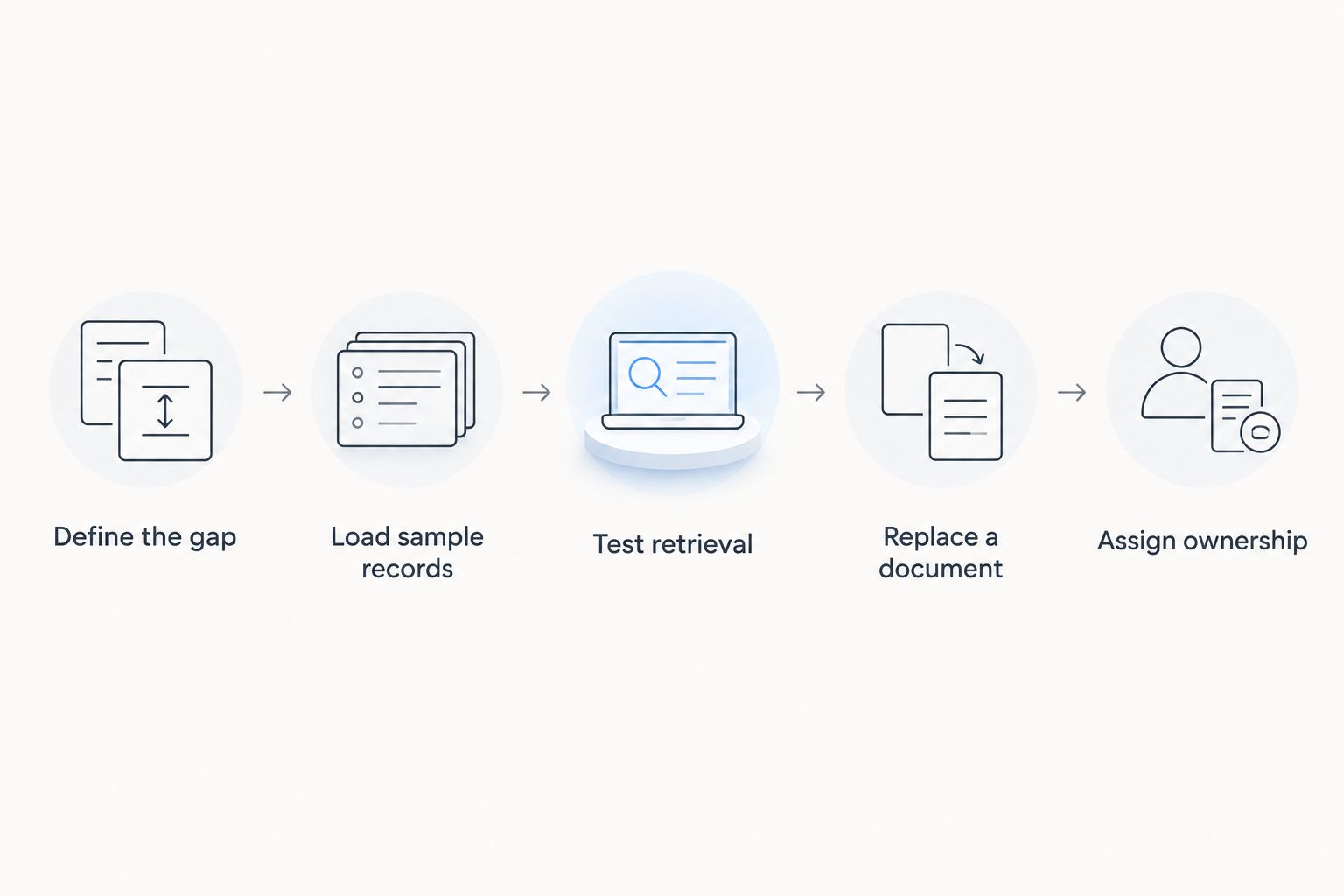
Work through these steps in order:
- Define the gap. Write down the task you need to improve and who performs it today.
- Load sample records. Follow the proposed setup process using your sample material.
- Test retrieval. Ask a driver and an office user to locate the relevant record through their respective workflows.
- Replace a document. Check how the process distinguishes the replacement from the old copy.
- Assign ownership. Record who will maintain the information after implementation.
A useful evaluation ends with an operating decision: who does what, where records live, and how drivers retrieve them. A polished presentation without those answers is not enough to choose a system.
Evaluate your document workflow
Review mobile driver and vehicle document management against your fleet's daily tasks.
How these options were ranked
This 2026 ranking prioritizes the stated small-fleet document-management use case, then separates the adjacent jobs that require a different buying decision. The criteria are operational fit, driver access, record ownership, document control, retrieval, and administrative workload.
The order is a decision path, not a claim that every product in one category outperforms every product in another. A fleet with an urgent electronic logging need should start with the ELD category, even though mobile permit management appears first here.
Which option should you choose?
Choose mobile permit and document-management software when your central problem is getting the right records to the right people. Choose ELD-focused software for electronic logging needs, and driver qualification software for qualification-file administration.
Keep shared storage only where your manual process is clear and sustainable. Avoid adding overlapping systems until you can explain which system owns each record and which person owns each task.
For your 2026 shortlist, prioritize the unresolved workflow over the longest feature list. A smaller, well-defined implementation is a better buying decision than purchasing functions without assigning responsibility for them.
FAQ
What's the best fleet compliance software for small fleets?
Digitalpermitbook is the best fit in this guide for small fleets prioritizing mobile permit, driver, and vehicle-document management. Choose a different category first if electronic logging or driver qualification administration is your main need.
Do small fleets need both an ELD and document-management software?
Electronic logging and document management address different tasks. Determine which requirements apply to your operation, then check whether your existing systems handle both workflows adequately.
Can cloud storage replace fleet compliance software?
Cloud storage can organize files, but it does not supply a complete compliance process by itself. Your team must maintain the checklist, review responsibilities, replacement rules, and access controls.
Is driver qualification software the same as permit software?
No, driver qualification software centers on driver-file administration, while permit software centers on a different record-management need. Evaluate each against the records and tasks your fleet must maintain.
What should an owner-operator prioritize when choosing software?
An owner-operator should prioritize the unresolved task that creates the most administrative friction. Separate mobile document access, electronic logging, and qualification-file work before comparing products.
How should I evaluate fleet compliance software in 2026?
Use representative sample records to test setup, retrieval, replacement, and ownership. Include both the driver workflow and the office workflow rather than judging the system from a dashboard alone.
One last thing
Test a replacement document, not just a successful upload. Uploading proves that a file can enter the system; replacing it shows whether your process helps people distinguish the current record from the old one.
Make that a required demonstration step. It exposes the difference between having documents somewhere and having a record-management process your team can follow.