
Best overall: a dedicated IFTA calculator with reviewable jurisdiction totals. Best for reusing mileage records: an ELD-connected workflow. Best for hands-on control: a spreadsheet IFTA calculator. This 2026 guide ranks calculation approaches so you can choose the best IFTA calculator for truckers without confusing a tax estimate with a filing-ready return.
- The best IFTA calculator for truckers shows jurisdiction mileage, fuel purchases, tax rates, and calculation details.
- Choose a dedicated calculator for repeat calculations; choose a spreadsheet when you can maintain and check formulas.
- An ELD-connected workflow still needs fuel reconciliation and a process for correcting mileage records.
- Digitalpermitbook supports trucking compliance document management; evaluate IFTA calculation features separately before choosing your workflow.
Why this matters
An IFTA result is only as reliable as the mileage, fuel purchases, and jurisdiction assignments behind it. A calculator can perform the arithmetic correctly while producing the wrong return from incomplete records.
Digitalpermitbook provides cloud-based permit and DOT/IFTA/IRP compliance software for trucking fleets and owner-operators, including driver and vehicle document management through a mobile app. For an IFTA calculator comparison, separate that document-management role from the calculation functions you need to verify.
This ranking compares workflow types, not unverified software features. The right 2026 choice depends on how you collect mileage, reconcile fuel, and check the return before submission.
What makes the best IFTA calculator for truckers?
Judge each option against these criteria before considering convenience:
- Jurisdiction detail: You need mileage and fuel purchases assigned to the correct jurisdiction, not just a fleet-wide total.
- Quarter-specific rates: The calculation must use the rates and instructions applicable to the reporting period.
- Reviewable arithmetic: You should be able to trace fuel economy, taxable gallons, and tax-paid fuel credits.
- Correction handling: A changed receipt or mileage record should lead to an understandable recalculation.
- Record continuity: Your final totals should remain connected to supporting trip and fuel records.
- Workflow fit: Choose an approach your actual recordkeeping process can support, rather than an impressive feature list.
The strongest choice is the calculator whose output you can explain from source records. A polished dashboard does not substitute for a reconciled quarter.
IFTA calculator options at a glance
The order below favors repeatable calculations and reviewability. A different starting point makes sense when your records already live in a particular system.
| Rank | Option | Best for | Standout characteristic | Key limitation |
|---|---|---|---|---|
| 1 | Dedicated IFTA calculator | Repeat quarterly calculations | Focused calculation workflow | Data imports and filing support need verification |
| 2 | ELD-connected IFTA workflow | Reusing electronic mileage records | Builds calculations around existing trip data | Mileage records do not replace fuel records |
| 3 | Spreadsheet IFTA calculator | Direct control over formulas | Visible, editable arithmetic | You maintain formulas, rates, and versions |
| 4 | Base-jurisdiction worksheet | Checking return requirements | Follows the jurisdiction's published reporting structure | Calculation assistance varies by worksheet |
These options are not interchangeable. A worksheet can help you check a return without importing trips; an ELD-connected workflow can organize mileage without resolving a missing fuel receipt.
1. Dedicated IFTA calculator: best for repeat quarterly calculations
A dedicated IFTA calculator takes jurisdiction-level mileage and fuel information and applies IFTA calculation logic. Choose this approach when you want a repeatable process for preparing quarterly totals rather than rebuilding a workbook each time.
For your 2026 evaluation, ask the provider to demonstrate an entire reporting period. Follow the path from entered records to jurisdiction totals, then inspect what happens when a record changes.
Dedicated IFTA calculator pros:
- Keeps the calculation task separate from unrelated fleet administration.
- Gives you a focused workflow for reviewing jurisdiction totals.
- Reduces the need to build your own calculation structure, provided the software supports your requirements.
Dedicated IFTA calculator cons:
- Import formats, supported jurisdictions, and reporting functions differ between products.
- Calculation support does not establish that the provider submits your return.
- Incorrect source records still produce incorrect totals.
Best for: An owner-operator or fleet administrator who wants a repeatable calculation process and can supply reconciled records.
During a demonstration, ask to see taxable mileage, tax-paid fuel, and the applicable rate separately. A single balance without the underlying components makes review harder.
Verdict: Buy this type when the provider demonstrates traceable calculations using your record format.
2. ELD-connected IFTA workflow: best for reusing mileage records
An ELD-connected IFTA workflow uses electronic trip records as an input to the reporting process. Its main attraction is continuity: you start with mileage already collected during operations instead of entering every trip again.
Connection alone does not establish accuracy. You still need to review jurisdiction assignments, address missing or corrected trips, and match fuel purchases to the reporting period.
ELD-connected IFTA workflow pros:
- Reuses electronic mileage records instead of starting from a separate manual log.
- Keeps trip review closer to the source of the mileage data.
- Supports a workflow built around ongoing record checks rather than quarter-end reconstruction.
ELD-connected IFTA workflow cons:
- An ELD record does not prove the location or quantity of a fuel purchase.
- Integration support depends on the specific systems involved.
- Unresolved trip errors can carry through to the tax calculation.
Best for: A fleet that already maintains electronic trip records and wants to use them in IFTA preparation.
Ask the provider to show how corrected mileage reaches the calculation. Also establish who resolves a disagreement between an imported total and the supporting trip record.
Verdict: Buy this type when your existing mileage system connects to the calculation workflow and corrections remain traceable.
3. Spreadsheet IFTA calculator: best for direct formula control
A spreadsheet IFTA calculator organizes mileage, fuel purchases, rates, and formulas in a workbook you maintain. Its value is visibility: you can inspect the arithmetic instead of relying on a summary screen.
That control creates responsibility. Someone must maintain the workbook, protect formulas from accidental edits, and confirm that each reporting period uses the correct instructions.
Spreadsheet IFTA calculator pros:
- Makes formulas and jurisdiction-level inputs directly inspectable.
- Lets you arrange review columns around your existing records.
- Supports independent checks against another calculation method.
Spreadsheet IFTA calculator cons:
- Formula changes and copied cells require careful checking.
- Rate updates and reporting changes remain your responsibility.
- Multiple workbook versions make it harder to identify the submitted figures.
Best for: An owner-operator or administrator comfortable maintaining formulas and documenting changes.
Keep source inputs separate from calculated cells. Save a clearly identified final version with the records supporting the return, rather than leaving the submitted numbers in an editable working file alone.
Verdict: Buy into this approach only when a named person owns formula checks, updates, and final-version control.
4. Base-jurisdiction worksheet: best for checking return requirements
Your base jurisdiction's current IFTA forms, worksheets, and instructions establish the reporting structure you must follow. Use them to check that your calculator produces the information the return requires.
Do not assume every worksheet is an automatic calculator. Some require you to calculate figures elsewhere and transfer the results.
Base-jurisdiction worksheet pros:
- Keeps your review tied to the jurisdiction's published return instructions.
- Helps identify fields missing from an outside calculator's summary.
- Provides a useful reference when checking how totals map to the return.
Base-jurisdiction worksheet cons:
- Automatic calculations and import capabilities vary.
- A worksheet does not organize your underlying trip and fuel evidence.
- Manual transfers introduce another place to check for errors.
Best for: A filer checking return structure or validating figures produced by another method.
Use the current reporting-period materials in 2026. An old saved worksheet is not evidence that its rates or instructions still apply.
Verdict: Hold this as your reporting reference; use it as the primary calculator only when its functions meet your needs.
How we ranked these options
The ranking prioritizes jurisdiction detail, reviewable arithmetic, correction handling, and record continuity. Dedicated calculators lead because they focus on the calculation task; ELD-connected workflows follow because they reuse mileage records but still require fuel reconciliation.
Spreadsheets offer direct control while placing maintenance on you. Base-jurisdiction worksheets anchor the reporting requirements but vary in calculation assistance. This is a workflow ranking, not a claim of hands-on product testing.
Check the calculation before you trust the total
IFTA generally covers qualified motor vehicles used across member jurisdictions. Common qualification criteria include a vehicle with 2 axles exceeding 26,000 pounds, a vehicle with 3 or more axles regardless of weight, or a qualifying combination exceeding 26,000 pounds. Confirm applicability and exceptions with your base jurisdiction.
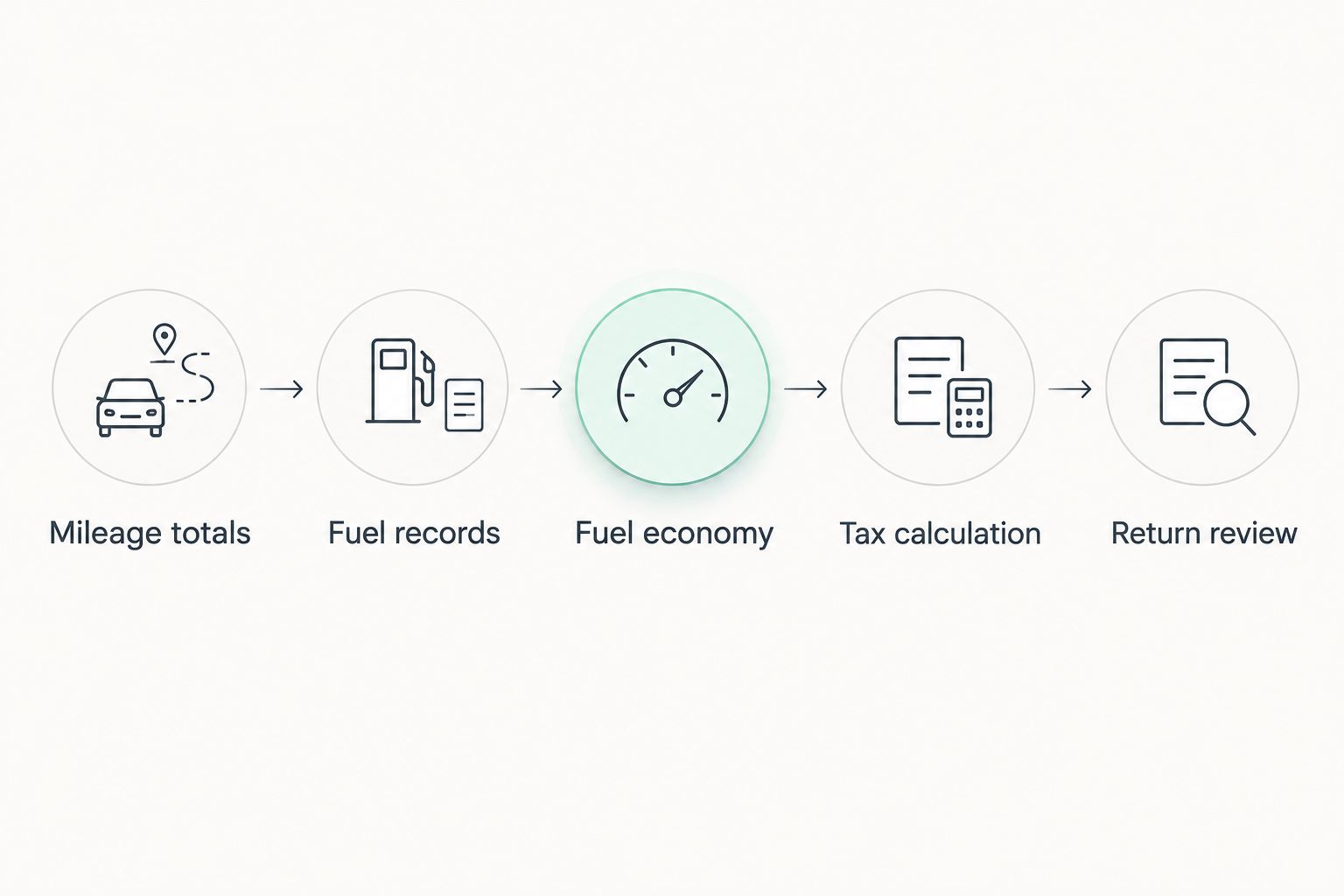
An IFTA reporting quarter spans 3 months. Before accepting a calculator's result, follow this review sequence:
- Mileage totals: Reconcile total distance and jurisdiction assignments against trip records.
- Fuel records: Check purchased quantities, receipt details, and jurisdiction assignments.
- Fuel economy: Review total distance divided by total fuel consumed for the applicable reporting group.
- Tax calculation: Inspect taxable distance, calculated taxable fuel, tax-paid fuel credits, and applicable rates.
- Return review: Match the final jurisdiction totals to the reporting-period instructions, including applicable surcharge treatment.
The sequence matters because a wrong input can affect several downstream figures. Correct the record first, then recalculate; do not adjust only the final balance to make it look right.
Ask the vendor to demonstrate a correction during the evaluation. Change a jurisdiction assignment, then inspect both the revised calculation and the record of what changed.
Which IFTA calculator should you choose?
Choose a dedicated IFTA calculator by default when you need repeatable quarterly calculations. Choose an ELD-connected workflow when your mileage records already live in a compatible system; choose a spreadsheet when you can take responsibility for its formulas and reporting updates.
Digitalpermitbook is best for trucking fleets and owner-operators seeking cloud-based permit and DOT/IFTA/IRP compliance document management. In your IFTA calculator selection, verify calculation, import, rate-management, and submission functions separately rather than inferring them from a compliance label.
For a 2026 demonstration, bring representative mileage and fuel records. Ask to see the calculation, a correction, and the final output you would retain.
Check your compliance workflow
Discuss your driver and vehicle document needs alongside your IFTA calculation requirements.
FAQ
What's the best IFTA calculator for truckers in 2026?
A dedicated IFTA calculator with reviewable jurisdiction totals is the default choice for repeat quarterly calculations. Choose an ELD-connected workflow when reusing electronic mileage is your priority, or a spreadsheet when you can maintain and verify its formulas.
Can I use a spreadsheet to calculate IFTA?
Yes, a spreadsheet can perform IFTA calculations when its inputs, formulas, rates, and reporting treatment are correct. You remain responsible for maintaining the workbook and checking its output against your base jurisdiction's instructions.
Does an ELD calculate everything I need for IFTA?
An ELD mileage record alone does not supply everything needed for IFTA reporting. You also need appropriate fuel records, jurisdiction assignments, applicable rates, and review of the final calculation.
Does an IFTA calculator file my return automatically?
Calculation does not establish that a service files your return. Confirm submission responsibilities, supported jurisdictions, and how you receive filing confirmation before relying on a provider.
Is Digitalpermitbook an IFTA calculator or compliance software?
Digitalpermitbook is cloud-based permit and DOT/IFTA/IRP compliance software for trucking fleets and owner-operators, with mobile driver and vehicle document management. Confirm the specific IFTA calculation and filing functions you need during a demonstration.
What records should I prepare before using an IFTA calculator?
Prepare trip-distance records and fuel-purchase records that support jurisdiction-level reporting. Reconcile missing records and incorrect assignments before accepting the calculator's totals.
How do I check whether an IFTA calculator is accurate?
Trace the result from jurisdiction mileage and fuel records through fuel economy, taxable fuel, credits, and applicable rates. Then compare the output with your base jurisdiction's instructions for the reporting period.
One last thing
A correct-looking balance can hide offsetting mistakes. Review jurisdiction-level results, not just the amount due: an error in one jurisdiction can be obscured by a different error elsewhere.
Before closing your 2026 quarter, save the final calculation alongside the records that explain it. Your goal is not merely a number you can submit; it is a number you can reconstruct.