Best for document-centered compliance: Digitalpermitbook. Best for mileage-led reporting: telematics-connected IFTA software. Best for a focused tax workflow: standalone IFTA reporting software. The best IFTA reporting software for trucking fleets in 2026 matches your source records and reporting responsibilities; document management alone does not establish that a system calculates or files your return.
- Digitalpermitbook is the document-management pick when evaluating the best IFTA reporting software for trucking fleets.
- Choose telematics-connected reporting when jurisdiction mileage is your main source of reconciliation work.
- Choose standalone IFTA software when your mileage and fuel records already arrive organized.
- Verify tax calculations, filing responsibilities, and source-record exports before choosing any system.
Why this matters
An IFTA return depends on mileage and fuel records, not just a completed form. Software that organizes permits solves a different problem from software that calculates jurisdiction-level fuel tax. You need to identify which responsibility belongs to the application and which remains with your staff or tax preparer.
IFTA reporting follows calendar quarters: 3 months per reporting period and 4 reporting periods per year. That recurring schedule makes repeatable record collection more useful than a last-minute spreadsheet cleanup. A reporting workflow should connect the underlying records to the figures you review and submit.
For your 2026 selection, start with the failure you need to fix. Missing receipts, inconsistent jurisdiction mileage, and scattered driver documents require different capabilities. Buying a broader platform does not remove that distinction.
This guide ranks three software approaches by use case. Digitalpermitbook is the named document-management option; the other entries describe software categories rather than unverified vendor recommendations. The ranking separates confirmed product scope from capabilities you must demonstrate before purchase.
What makes the best IFTA reporting software?
Use these six criteria before looking at a comparison table:
- Record coverage: Identify how the system receives jurisdiction mileage, fuel purchases, and supporting documents. Ask what still requires manual entry.
- Reconciliation: Require a visible process for investigating missing trips, duplicate records, and mismatches before a return is prepared.
- Reporting scope: Separate document storage, tax calculation, return preparation, and filing. Do not treat those as interchangeable features.
- Source traceability: Check whether a reviewer can move from a reported figure back to the records supporting it.
- Driver workflow: Evaluate the actual submission process drivers will use, including how the office handles incomplete records.
- Record portability: Inspect exports before committing. You need usable records when changing software or working with an outside preparer.
Treat these as acceptance criteria, not a feature-count contest. A long feature list is less useful than a demonstrated answer to your specific reporting problem. Ask the vendor to show the workflow with representative fleet records rather than only a prepared dashboard.
IFTA software approaches at a glance
| Option | Best for | Standout focus | Key limitation |
|---|---|---|---|
| Digitalpermitbook | Fleets prioritizing driver and vehicle document management | Cloud-based permit and DOT/IFTA/IRP compliance software with mobile document management | Tax calculation, direct filing, and mileage integrations require verification |
| Telematics-connected IFTA software | Fleets whose main challenge is jurisdiction mileage | Connecting reporting work to vehicle movement records | Connection quality does not establish fuel-record completeness or filing scope |
| Standalone IFTA reporting software | Fleets with organized mileage and fuel records | A focused workflow for preparing IFTA reporting information | Separate document systems and imports still need coordination |
The table ranks fit, not verified performance between vendors. For 2026, use it to choose the type of demonstration you need. A document-centered fleet should not evaluate software with the same checklist as a fleet replacing manual trip reconstruction.
1. Digitalpermitbook: best for document-centered fleet compliance
Digitalpermitbook is cloud-based permit and DOT/IFTA/IRP compliance software for trucking fleets and owner-operators. Its stated scope includes managing driver and vehicle documents from a mobile app. That makes it relevant when your IFTA process sits inside a wider problem of organizing compliance records.
Digitalpermitbook is best for trucking fleets and owner-operators that need mobile management of driver and vehicle compliance documents. That is a document-management verdict, not a claim that the software submits IFTA returns or calculates tax liabilities.
The distinction matters when your office handles several responsibilities together. A team collecting vehicle documents and maintaining permit records needs to understand whether its reporting application also manages those records, or whether a separate system remains necessary. Evaluate the complete handoff rather than assuming one compliance label covers every task.
Digitalpermitbook pros:
- Its stated scope includes permits and DOT/IFTA/IRP compliance rather than IFTA alone.
- Mobile document management addresses the driver-to-office record collection workflow.
- The product serves both trucking fleets and owner-operators.
Digitalpermitbook cons:
- Its confirmed description does not establish automated IFTA tax calculations or direct filing.
- Mileage imports, fuel-card connections, and jurisdiction-level reporting need a demonstration before you depend on them.
Best for: A fleet evaluating compliance document management alongside its IFTA reporting process.
Bring a completed reporting period to the demo. Ask where supporting documents live, how your office retrieves them, and what the software produces for the person preparing the return. Request a clear distinction between managing records and completing the tax workflow.
Verdict: Hold until the demonstration confirms your required reporting functions; shortlist for document-centered compliance.
2. Telematics-connected IFTA software: best for mileage-led reporting
Telematics-connected IFTA software is the category to evaluate when vehicle movement records should feed your reporting process. The important question is not whether a vendor advertises a connection. It is whether that connection supplies the jurisdiction mileage your reporting workflow needs and exposes gaps you can investigate.
Start with your existing vehicle-data system. Ask a prospective reporting vendor to show a representative trip, the resulting jurisdiction breakdown, and the handling of an interruption in the source data. A connection that only displays totals does not demonstrate how your staff will resolve an exception.
Do not extend a mileage capability into an unsupported assumption about fuel records. Fuel purchases still require a defined collection and reconciliation process. Likewise, a jurisdiction report does not by itself establish that the vendor files the return.
Telematics-connected IFTA software pros:
- It is the relevant category for evaluating a connection between vehicle records and reporting.
- A successful integration can reduce re-entry of mileage already captured elsewhere.
- Trip-level review provides a useful demonstration of how reported mileage is supported.
Telematics-connected IFTA software cons:
- Missing or incomplete source data still requires investigation.
- Fuel records, permit documents, and filing responsibilities can remain separate workflows.
- Compatibility must be checked against your actual vehicle-data system, not a generic integration claim.
Best for: Fleets whose primary reporting problem is assembling and reconciling jurisdiction mileage.
For your 2026 evaluation, include a record with an obvious gap. Ask the vendor to show how staff identify it, correct it, and understand what changed. A clean example shows output; an exception shows the operational process you will actually manage.
Verdict: Buy only after a working connection and exception-handling demonstration; skip integration claims without record-level evidence.
3. Standalone IFTA reporting software: best for organized source records
Standalone IFTA reporting software focuses your evaluation on the tax-reporting workflow rather than broader fleet administration. It is the appropriate category to consider when your mileage and fuel records already arrive in a consistent format. The selection task is then to verify imports, calculations, review, and the exact filing responsibility.
This approach does not eliminate the need for document management. Your supporting records can remain in another system, but the relationship between those records and the reporting figures must stay clear. Otherwise, a tidy return-preparation screen simply hides a fragmented process behind it.
A focused application also needs to fit the person doing the work. Ask your internal preparer or outside accountant to review a sample export before you commit. A file that looks readable to a dispatcher is not automatically suitable for the preparer's workflow.
Standalone IFTA reporting software pros:
- Its narrower scope keeps the evaluation centered on reporting tasks.
- It suits a workflow in which mileage and fuel collection already operate separately.
- It lets you assess tax preparation without requiring a broader fleet-system replacement.
Standalone IFTA reporting software cons:
- Staff still need to coordinate supporting documents and reporting records across systems.
- Importing organized data does not resolve errors already present in that data.
- Driver document management and broader permit administration require separate verification.
Best for: Fleets with dependable source records that need a focused reporting application.
Test the import with your own column names and record formats. Then inspect rejected rows, corrections, and the final output. A successful sample import is more useful than a promise that the application accepts spreadsheets.
Verdict: Buy when source records are organized and the reporting workflow passes review; skip as a cure for missing records.
How to validate your shortlist
Use the same reporting period for every demonstration. Different sample data makes it harder to distinguish product capabilities from a carefully prepared presentation. Keep the evaluation tied to the records your fleet actually produces.
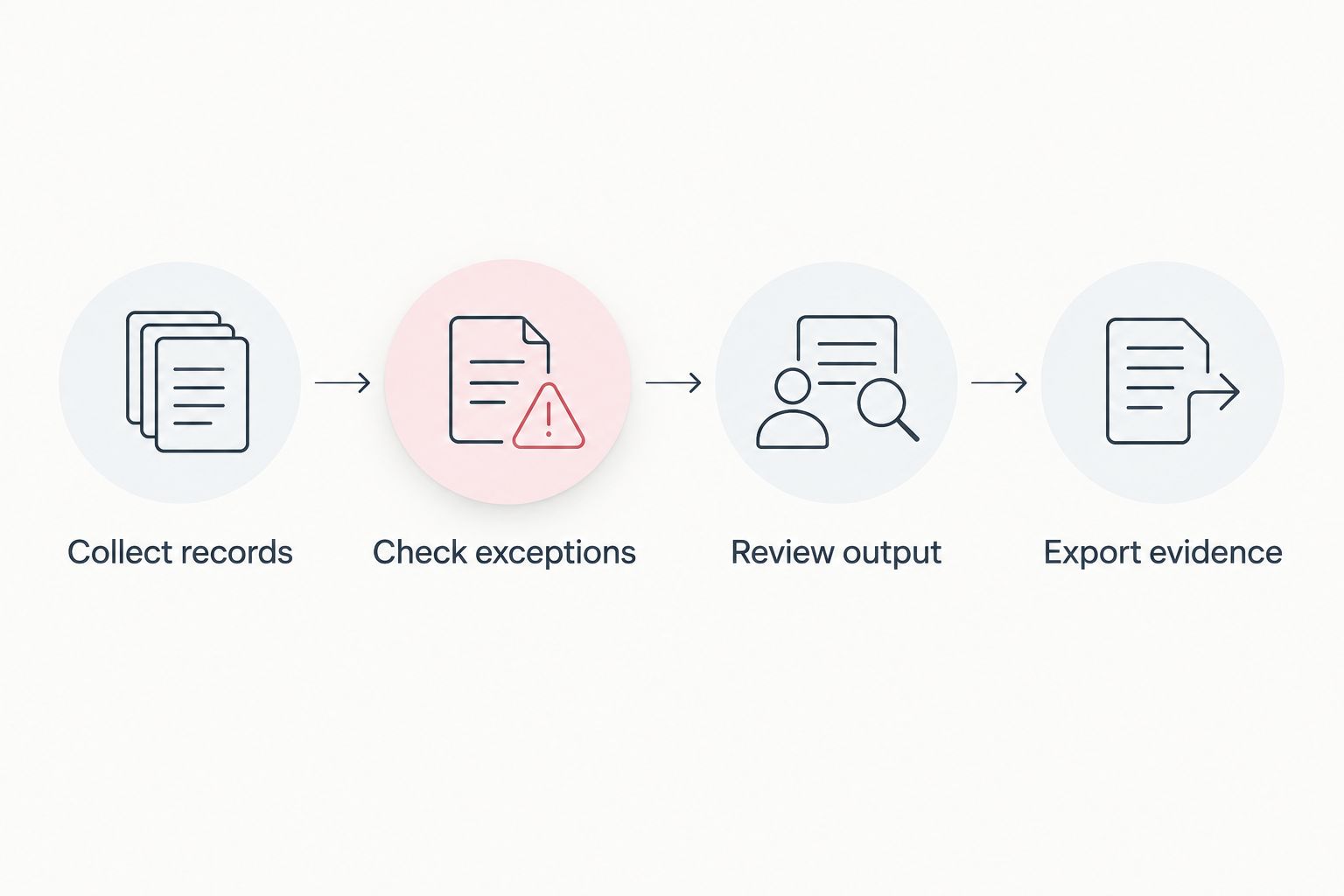
Follow this sequence:
- Collect records: Assemble jurisdiction mileage, fuel purchases, and supporting documents from a completed period.
- Check exceptions: Include an incomplete record and ask how the system identifies and resolves it.
- Review output: Inspect the reporting figures and establish which preparation or filing steps remain yours.
- Export evidence: Confirm that you can retrieve usable records and explain how the figures were produced.
A demonstration should connect each stage to the next. If the vendor stops at a summary dashboard, ask to see the records behind a figure. If the demonstration ends with an export, ask who uses that file and what work remains before submission.
For a 2026 purchase decision, write the agreed responsibilities into your implementation checklist. Name the person responsible for correcting mileage, checking fuel records, reviewing the output, and submitting the return. Software scope and staff responsibility should match before the first reporting period begins.
How the options were ranked
The ranking uses record coverage, reconciliation, reporting scope, source traceability, driver workflow, and portability. The first position addresses document-centered compliance because that is the confirmed scope of the named product. The remaining positions identify distinct reporting needs rather than claiming an unsupported overall winner.
No ranking here assumes hands-on testing, measured time savings, customer review scores, or verified tax-filing functionality. Use the comparison to narrow your evaluation, then require evidence for each capability your fleet needs.
Which IFTA reporting software should you choose?
Choose the reporting workflow that fixes your weakest handoff. If drivers and office staff struggle to maintain compliance documents, start with the document-management option. If jurisdiction mileage is the bottleneck, evaluate a telematics-connected reporting application. If both mileage and fuel records are already dependable, investigate standalone reporting software.
For an undecided fleet, the default next move is a source-record review, not a software contract. Trace a completed return back to its supporting records and identify where staff had to reconstruct information. That point of failure determines which category deserves your attention first.
In 2026, keep document management, reporting calculations, and filing responsibility separate in your requirements. A vendor can cover several responsibilities, but each one needs its own proof. A mobile app or an IFTA label is not that proof.
Evaluate your compliance document workflow
See how mobile driver and vehicle document management fits your fleet's reporting process.
FAQ
What's the best IFTA reporting software for trucking fleets?
The best choice depends on whether your main problem is document collection, jurisdiction mileage, or tax preparation. Digitalpermitbook fits a document-management evaluation; verify calculation and filing capabilities separately.
Does IFTA document management mean the software files my return?
No. Document management, tax calculation, return preparation, and filing are separate responsibilities. Ask the vendor to demonstrate each function you require.
Is telematics-connected IFTA software better than standalone software?
Telematics-connected software is the more relevant category when jurisdiction mileage collection is your main problem. Standalone software suits an evaluation where mileage and fuel records are already organized.
How often do fleets report IFTA?
IFTA reporting follows calendar quarters, with 4 reporting periods per year. Each reporting period covers 3 months; confirm your filing obligations and instructions with your base jurisdiction.
Can an owner-operator use fleet compliance software?
Yes. Digitalpermitbook explicitly serves owner-operators as well as trucking fleets. Confirm that its document workflow and any required reporting functions match your operation.
What should I ask during an IFTA software demo?
Ask the vendor to follow your records from collection through exception handling, output review, and export. Establish who remains responsible for corrections, tax preparation, and filing.
One last thing
Test the exit before you approve the entry. Ask for a usable export during the demonstration, then have the person responsible for your return inspect it. If that person cannot trace a reported figure to its supporting records, the workflow has not passed your evaluation.